
Next.js vs. React
📚 Table of Contents
- The Era of Client-Side Rendering (The React Baseline)
- The Performance Bottleneck: Anatomy of a CSR Request
- The Paradigm Shift: Server-Side Rendering (SSR)
- Deep Dive: React Server Components (RSC)
- Architectural Comparison: Data Fetching
- SEO and Core Web Vitals
- Conclusion
1. The Era of Client-Side Rendering (The React Baseline)
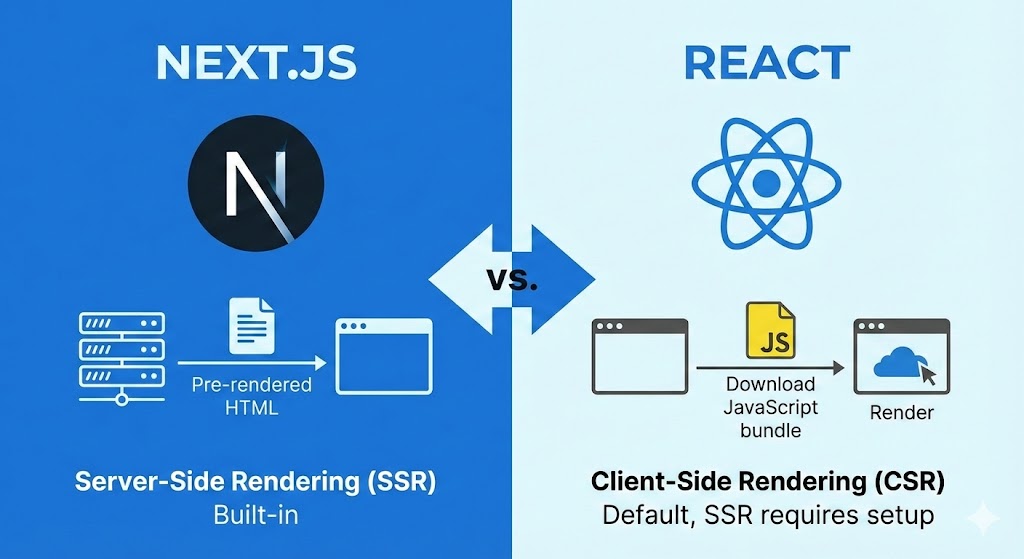
To understand why Next.js is necessary, we must first rigorously analyze what "standard" React actually does. React, in its default state (created via Vite or Create React App), utilizes Client-Side Rendering (CSR).
In a CSR architecture, the logic of what to show on the screen resides entirely within the JavaScript bundle. The server is essentially a dumb pipe; it delivers an empty container, and the browser does the heavy lifting.
The "Empty Shell" Phenomenon
When a user visits a pure React application, the server responds with an HTML file that looks almost exactly like this:
<!DOCTYPE html>
<html lang="en">
  <head>
    <title>My React App</title>
  </head>
  <body>
    <div id="root"></div>
    <script src="/bundle.js"></script>
  </body>
</html>
Notice the <div id="root"> is empty. There is no content. No headers. No text. This has two immediate, critical consequences:
- Search Engines (Crawlers): If a bot requests this page and doesn't execute JavaScript (or executes it slowly), it sees a blank page. It indexes nothing.
- User Experience (FCP): The user stares at a white screen until
bundle.jsdownloads, parses, executes, and inserts DOM elements.
2. The Performance Bottleneck: Anatomy of a CSR Request
Let's trace the network waterfall of a standard React application. This timeline reveals the inherent latency in CSR.
The CSR Waterfall
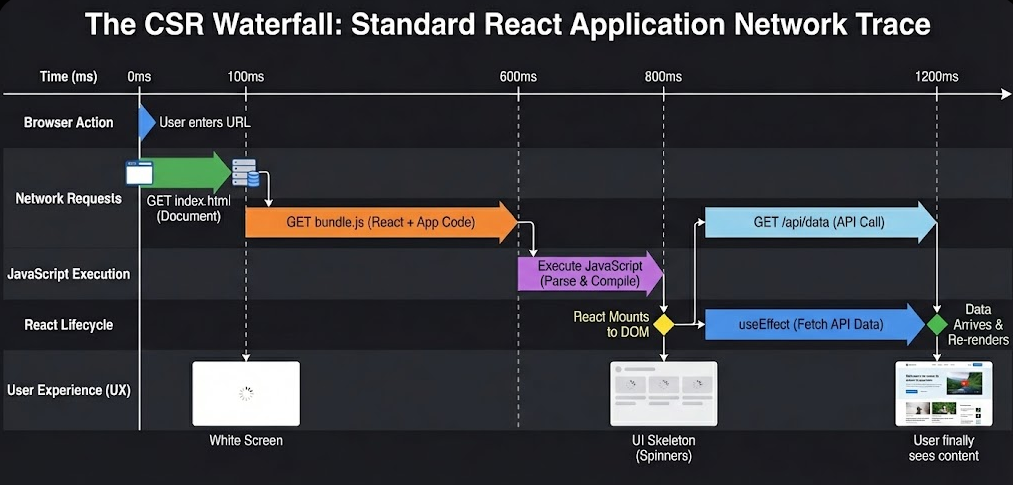
- 0ms: User enters URL.
- 100ms: Browser receives
index.html. User sees White Screen. - 100ms - 600ms: Browser downloads the massive
bundle.js(React library + your code). - 600ms - 800ms: Browser executes JavaScript.
- 800ms: React mounts to the DOM. User sees UI Skeleton (Spinners).
- 800ms - 1200ms:
useEffectruns to fetch API data. - 1200ms: Data arrives. React re-renders. User finally sees content.
Total Time to Interactive: 1.2 Seconds.
This "Waterfall" approach is inefficient because fetching data cannot start until the JavaScript has finished loading. We are serializing network requests that should be parallelized.
3. The Paradigm Shift: Server-Side Rendering (SSR)
Next.js introduces Server-Side Rendering to invert this model. Instead of sending an empty HTML shell and a script, the server runs the React code before sending the response.
The SSR Architecture
When a request hits a Next.js server:
- The server accepts the request.
- The server fetches the required API data (database queries, CMS calls).
- The server renders the React components into a purely HTML string.
- The server sends this fully populated HTML to the browser.
The "Hydration" Process
This is the most misunderstood concept in Next.js. You might ask: "If we send HTML, how is it interactive? How do buttons work?"
This is achieved through Hydration.
- Phase 1 (Pre-render): The user receives static HTML. They can see the content immediately (e.g., the blog post text), but they cannot click buttons yet.
- Phase 2 (Hydration): React loads in the background, attaches itself to the existing HTML, and "activates" the event listeners (
onClick,onChange).
The result is a page that looks fast (High Perceived Performance) and becomes interactive shortly after.
4. Deep Dive: React Server Components (RSC)
Starting with Next.js 13+ (App Router), the framework introduced an even more aggressive optimization: React Server Components (RSC).
In standard SSR, the JavaScript for every component is still sent to the client to "hydrate" it. With Server Components, we can choose components that never leave the server.
The Zero-Bundle-Size Advantage
Imagine a component that formats a date using a heavy library like moment.js or renders markdown.
- In Standard React: The user downloads
moment.js(20kb) just to see a date. - In Next.js Server Components: The server runs
moment.js, generates the text string "Oct 20, 2024", and sends only that text to the browser. The heavy library remains on the server.
| Feature | Client Component ('use client') | Server Component (Default) |
|---|---|---|
| Data Fetching | Can use useEffect / SWR | Async/Await directly in component |
| Backend Access | No (Security Risk) | Yes (Direct DB access allowed) |
| Bundle Size | Adds to client bundle | Zero impact on client bundle |
| Interactivity | Yes (onClick, useState) | No (Static content only) |
5. Architectural Comparison: Data Fetching
This is where the developer experience drastically differs.
Scenario: Building a Dashboard. We need to fetch a user's profile and their recent orders.
The Old Way (React CSR)
We must manage loading states, errors, and effects manually.
// client-dashboard.jsx
import { useState, useEffect } from 'react';

export default function Dashboard() {
  const [user, setUser] = useState(null);
  const [loading, setLoading] = useState(true);

  useEffect(() => {
    async function fetchData() {
      const res = await fetch('/api/user');
      const data = await res.json();
      setUser(data);
      setLoading(false);
    }
    fetchData();
  }, []);

  if (loading) return <div className="spinner">Loading...</div>;

  return <h1>Hello, {user.name}</h1>;
}
The Modern Way (Next.js SSR)
We mark the component as async. The data fetch blocks the rendering on the server, so the client only receives the final HTML. Note the absence of useEffect and useState.
// app/dashboard/page.jsx (Server Component)
import db from '@/lib/db'; // Direct database access!

export default async function Dashboard() {
  // This runs on the server. The browser never sees this line.
  const user = await db.user.findUnique({ where: { id: 1 } });

  // The browser receives pure HTML: <h1>Hello, Alice</h1>
  return (
    <main>
      <h1>Hello, {user.name}</h1>
      <RecentOrders userId={user.id} />
    </main>
  );
}
Technical Benefits of the Next.js Approach:
- No Client-Server Waterfalls: The server has low latency access to the database. It fetches data in 5ms, whereas a client request might take 200ms.
- Security: API keys and database logic remain strictly on the server. You don't need to expose a public API endpoint for every piece of data.
- Type Safety: If you use TypeScript, the data flows directly from your DB schema to your component without needing API response typing.
6. SEO and Core Web Vitals
The primary business case for Next.js is Search Engine Optimization (SEO).
How Google Bots See Your Site
- React (CSR): Googlebot visits. It sees
<div id="root">. It queues the page for "rendering" (JavaScript execution). This rendering queue can be delayed by days. Complex JS can time out the crawler. - Next.js (SSR): Googlebot visits. It sees
<h1>The Best Product</h1><p>Description...</p>. It indexes the content immediately.
Core Web Vitals Impact
Next.js automatically optimizes the metrics Google uses to rank websites:
- LCP (Largest Contentful Paint): Since the HTML is pre-generated, the main content appears almost instantly.
- CLS (Cumulative Layout Shift): Next.js includes an
Imagecomponent that automatically reserves space for images before they load, preventing the layout from "jumping" and ruining the user experience. - FID (First Input Delay): By offloading heavy logic to the server (Server Components), the main thread on the browser is less clogged, allowing it to respond to user clicks faster.
7. Conclusion
Migrating from React to Next.js is not just about changing file extensions; it is a fundamental shift in where we choose to process logic.
By moving rendering to the server:
- We reduce the burden on the user's device (battery, CPU).
- We ensure content is accessible to every crawler and bot.
- We simplify data fetching by removing the need for complex client-side state management for initial data.
Next.js does not replace React; it elevates it. It allows React to stop being just a UI library and become a full-stack framework capable of delivering enterprise-grade performance.